
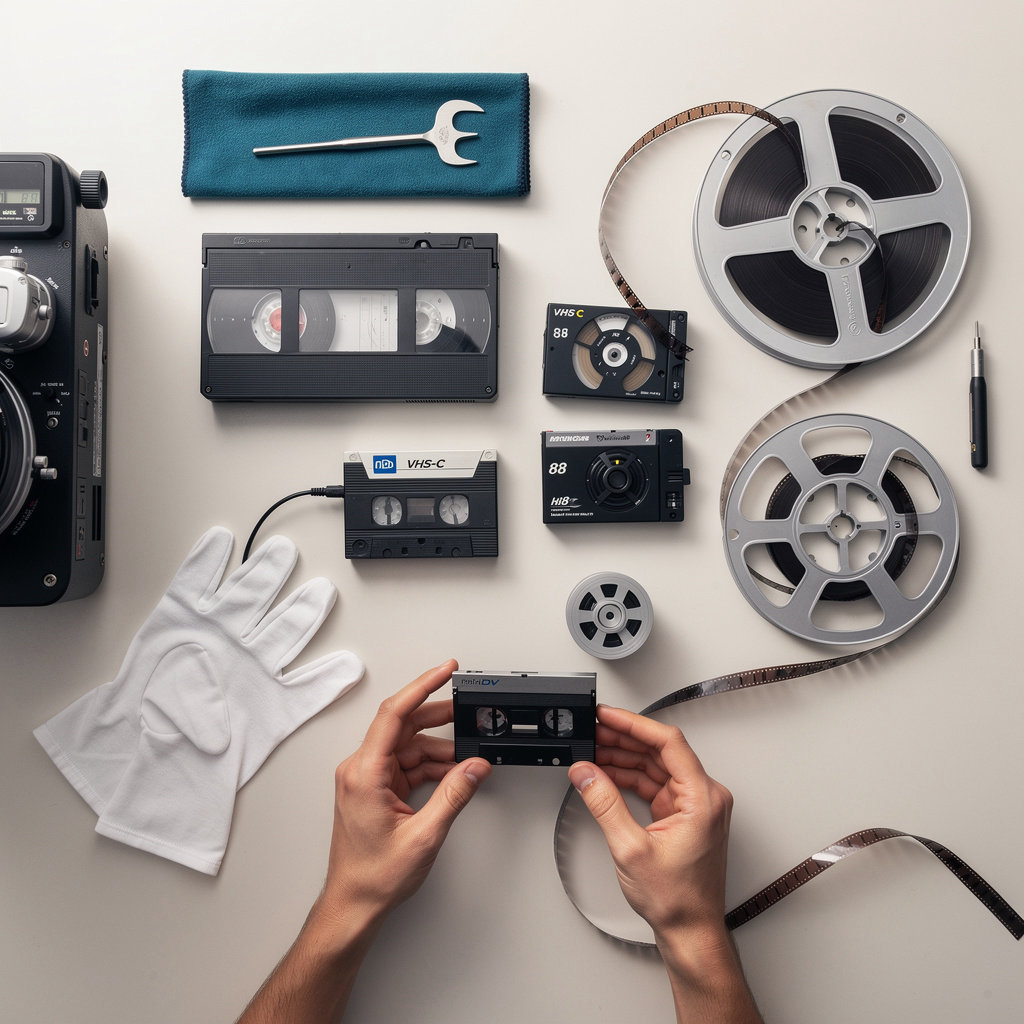
Understanding Video Formats
Your old tapes and film reels tell a story—but only if you can access them. Understanding what format you have is the first step toward preserving your memories and creative work.
VHS & VCR Tapes
The standard for home video recording from the 1980s through early 2000s. Recognizable by their large black plastic cassettes. Over time, the magnetic oxide coating breaks down, causing color loss, tracking errors, and playback failure.
Why professional transfer matters: VCR equipment is becoming rare. Touchdown's on-premises processing captures your content before the tape degrades further.
8mm & Hi8 Camcorder Tape
Smaller format camcorder tapes used from the 1980s–1990s. Hi8 offered better quality than standard 8mm. These tapes are prone to mold growth, oxide shedding, and mechanical failure due to age and humidity.
Why professional transfer matters: Specialized camcorder decks are required. Improper handling can cause tape jamming or permanent data loss.
MiniDV Digital Tape
Digital format used in camcorders from the late 1990s–2010s. Smaller cassette with digital data storage. Despite being "digital," MiniDV tapes degrade over time—data loss can occur without warning if the tape is damaged or exposed to moisture.
Why professional transfer matters: MiniDV decks are expensive and increasingly unavailable. Touchdown's equipment ensures your digital data is captured before playback failure occurs.
8mm & Super 8 Film
Physical film stock used from the 1960s–1980s. Recognizable by film reels and cartridges. Film is subject to vinegar syndrome (chemical degradation), brittleness, and fading. Once damaged, film cannot be recovered.
Why professional transfer matters: Film scanning requires specialized equipment and expertise. DIY methods risk permanent damage. Touchdown preserves your film with professional-grade restoration.
Not sure what format you have? Our team can identify your tapes and recommend the best transfer approach.
Get Your Free ConsultationWhy DIY Transfer Isn't Worth the Risk
Equipment Obsolescence
VCRs, camcorders, and film projectors are increasingly hard to find. Even if you locate equipment, it may malfunction or cause tape damage.
Irreversible Damage
One wrong move—incorrect tape threading, excessive fast-forward, moisture exposure—can destroy decades-old footage permanently.
Quality Loss
Consumer-grade capture methods lose detail and color accuracy. Professional equipment preserves the original quality your tapes contain.
Touchdown's Difference: With 45+ years of expertise and on-premises processing, we handle your irreplaceable content with the care it deserves. Same-day service means your memories are digitized before degradation worsens.
How to Prepare Your Tapes
A few simple steps ensure your video materials arrive in great condition and we can deliver the best possible results. Don't worry if your tapes aren't perfect—we handle materials in all conditions, but proper preparation helps us preserve every frame.
Step 1: Identify Your Format
Look at your tapes and note what format you have. VHS tapes are the familiar rectangular cartridges you'd use in a VCR. MiniDV and Hi8 tapes are smaller camcorder formats. 8mm and Super 8 are film reels, not tape. If you're unsure, check the label or the camera/camcorder you used.
Do's and Don'ts:
- Do: Check the original case or label for format information.
- Don't: Guess—if you're unsure, mention it when you contact us for a free consultation.
Step 2: Check Tape Condition
Inspect your tapes for visible damage. Look for mold (white or colored spots), loose spools that rattle inside the case, cracked casings, or tape that's visibly warped or tangled. Don't be alarmed if you spot some of these issues—Touchdown can handle tapes in less-than-perfect condition. Just note the condition so we know what to expect.
Do's and Don'ts:
- Do: Document any visible damage with photos or notes.
- Don't: Try to repair damaged tapes yourself—let the professionals handle it.
- Don't: Force a tape into a player if it feels stuck or broken.
Step 3: Clean Gently
If your tapes have dust or debris on the outside, use a soft, dry cloth to gently wipe the case and exterior. That's it. Do not use water, solvents, or cleaning products. The magnetic tape inside is delicate—gentle exterior cleaning is all that's needed.
Do's and Don'ts:
- Do: Use a soft, dry cloth on the outside only.
- Don't: Use water, alcohol, or cleaning chemicals.
- Don't: Open the tape case or touch the magnetic tape inside.
Step 4: Store Properly Until Transfer
Keep your tapes in a cool, dry place away from direct sunlight, heat sources, and humidity. Magnetic tape degrades faster in warm, humid conditions. A bedroom closet or storage shelf is ideal. Avoid basements (humidity), attics (heat), or cars (temperature swings).
Do's and Don'ts:
- Do: Store in a cool, dry, dark location (60–70°F is ideal).
- Don't: Store near radiators, windows, or in humid basements.
- Don't: Leave tapes in cars or uninsulated spaces.
Step 5: Organize and Label
Before sending your tapes to us, create a simple list or label each one with: tape number, estimated date, what's on it (event, location, names), and any special notes (e.g., "important family footage" or "commercial project—high priority"). This helps us stay organized and ensures your files are delivered in the order you want.
Do's and Don'ts:
- Do: Label each tape clearly with a number and brief description.
- Do: Note important sections or time codes if you want specific clips highlighted.
- Don't: Use permanent marker directly on the tape—use a label or the case.
Step 6: Protect During Shipping
If you're mailing your tapes to us, use a sturdy box and pack them securely. Wrap each tape individually in bubble wrap or packing paper, and fill empty space in the box with packing peanuts or crumpled paper. This prevents shifting during transit. Use a shipping method with tracking so you know when your materials arrive.
Do's and Don'ts:
- Do: Use a sturdy cardboard box and fill empty space.
- Do: Wrap tapes individually in bubble wrap.
- Do: Use tracked shipping (USPS Priority Mail, UPS, FedEx).
- Don't: Use fragile stickers—standard handling is fine.
- Don't: Mail during extreme heat or cold (summer/winter extremes).
The Bottom Line
Proper preparation helps us deliver the best possible results, but don't stress if your tapes aren't in perfect condition. Touchdown has handled thousands of tapes in all states of wear—mold, damage, loose spools, and all. We're equipped and experienced to work with whatever you send us.
Ready to get started? Contact us for a free consultation, and we'll walk you through the process and answer any questions about your specific materials.
Storage & Preservation Tips
Your digitized files are only as valuable as your backup strategy. Learn how to protect both your original tapes and your new digital files for decades to come.
Original Tape Storage
Preserving your original tapes extends their lifespan and protects against digitization loss. Even after you've transferred to digital, originals remain valuable as a backup.
Ideal Storage Conditions
- • Temperature: Keep tapes between 60–70°F (15–21°C)
- • Humidity: Maintain 30–40% relative humidity (avoid moisture and dryness)
- • Location: Cool, dark place away from direct sunlight
- • Shelving: Upright storage on stable shelves (avoid stacking heavy items on top)
What to Avoid
- ❌ Heat sources (radiators, direct sunlight, attics)
- ❌ Moisture and humidity (basements, bathrooms)
- ❌ Magnetic fields (speakers, electronics, magnets)
- ❌ Frequent handling and rewinding
Digitized File Storage
Digital files are more stable than magnetic tape, but they require a multi-layered backup strategy to ensure long-term access and prevent data loss.
Storage Options
-
External Hard Drive
Fast access, large capacity. Best for active use and backups. Keep in cool, dry place. Test regularly.
-
Cloud Storage
Offsite backup, accessible anywhere. Ideal for sharing and redundancy. Consider privacy and subscription costs.
-
Network Attached Storage (NAS)
Home or office server with automatic backups. Good for large libraries. Requires power and maintenance.
-
USB Drive or DVD
Portable, affordable. Less reliable for long-term storage. Use only as supplementary backup.
Best Practice: 3-2-1 Rule
3 copies of your files • 2 different media types • 1 copy offsite
Digital vs. Magnetic Tape
Magnetic tape degrades over time. Digital files, when properly stored and backed up, can last indefinitely.
Magnetic Tape Degradation
- • Oxide breakdown (tape becomes brittle, spools loosen)
- • Mold growth in humid conditions
- • Head clogging and video tracking loss
- • Expected lifespan: 10–30 years (varies by format)
Digital File Stability
- • No physical degradation (if stored properly)
- • Infinitely reproducible without quality loss
- • Can be verified with checksums
- • Expected lifespan: 50+ years (with proper backup)
This is why digitization is the best preservation strategy. Once transferred, your content is protected from the physical decay that affects tape.
Backup Verification & Maintenance
Creating backups is only half the battle. Regular verification ensures your files remain accessible and uncorrupted.
Ongoing Maintenance Tasks
-
Annual Backup Check
Verify backups are readable. Test accessing random files to ensure data integrity.
-
Refresh Old Media
Every 5–10 years, copy files from aging drives to new storage (technology changes).
-
Monitor Storage Health
External drives and SSDs have limited lifespans. Replace before failure.
-
Plan for Format Changes
Video codecs and containers evolve. Ensure your archival format will remain accessible.
For Institutions & Archives
Consider professional archival services or periodic re-digitization from originals as tape formats become obsolete. Touchdown can support your long-term preservation plan.
Archival Best Practices for Families & Organizations
For Families & Individuals
- Organize files by year and event for easy browsing
- Create a family archive with backups on USB and cloud
- Share digital files with family members securely
- Store originals in safe deposit box or climate-controlled storage
- Document video content with metadata (dates, people, locations)
For Cultural Institutions & Archives
- Establish a digital preservation policy and timeline
- Use archival-grade storage media and professional backup systems
- Maintain detailed metadata and provenance documentation
- Implement redundant offsite backups (geographic separation)
- Plan for periodic re-digitization as technology evolves
Why Digitization Is the Best Preservation Strategy
Your original tapes are slowly degrading. Mold, oxide breakdown, and mechanical wear are inevitable. Digitization stops the clock by converting your content to a format that doesn't degrade physically.
Once digitized, your videos can be copied infinitely without quality loss, backed up across multiple locations, and accessed for decades without worry. Combined with proper storage practices, digitization ensures your memories and creative work survive for future generations.
Touchdown helps you take that critical first step. We handle the technical complexity so you can focus on preserving what matters.
Delivery Options Explained
Choose the format that works best for your workflow. Each option has distinct advantages—and you don't have to choose just one.
USB Drive
Description & Use Case
Portable, durable storage ideal for archival backup and sharing files across devices. Perfect for filmmakers, content creators, and institutions managing legacy content.
Storage Capacity
8GB–64GB options available. Standard USB 3.0 for fast file transfer.
Compatibility
Works on Windows, Mac, Linux, and most modern devices. No special software required.
Expected Lifespan
10–20 years with proper care. Resistant to physical wear and magnetic interference.
Cost
Included with most transfer packages. Additional USB drives available at modest cost.
Best for: Archival backup, offline storage, physical security.
DVD
Description & Use Case
Physical media playable on standard DVD players and computers. Familiar format for families and institutions with existing media libraries.
Storage Capacity
4.7GB per disc (standard). Multiple discs available for larger projects.
Compatibility
Plays on DVD players, computers (Windows and Mac), and most smart TVs. No regional restrictions on our transfers.
Expected Lifespan
15–25 years with archival-quality media. Sensitive to heat and light; proper storage extends longevity.
Cost
Typically $5–$10 per disc. Included in bundled DVD + USB packages.
Best for: Physical backup, family viewing, institutional archiving.
Digital Files
Description & Use Case
Cloud-based storage or direct download. Instant access, easy sharing with collaborators, and seamless integration into modern workflows.
Storage Capacity
Unlimited cloud storage options. High-resolution MP4 or other formats as requested.
Compatibility
Accessible on any device with internet. Works with editing software, streaming platforms, and content management systems.
Expected Lifespan
Indefinite with cloud backup. No physical degradation. Requires active account maintenance.
Cost
Included with most packages. Optional cloud storage subscriptions available for long-term hosting.
Best for: Immediate access, collaboration, modern workflows, easy sharing.
Quick Comparison
| Feature | USB Drive | DVD | Digital Files |
|---|---|---|---|
| Portability | Excellent | Good | Excellent (any device) |
| Durability | Very High | High (if stored properly) | Indefinite (cloud) |
| Ease of Sharing | Moderate (physical) | Moderate (physical) | Excellent (email, links) |
| Playback Without Computer | No | Yes (DVD player) | Yes (with internet) |
| Cost | Low | Low–Moderate | Free–Low |
| Long-Term Archival | Excellent | Good (if stored properly) | Excellent (cloud) |
Our Recommendation: The Best-of-Both-Worlds Approach
For maximum preservation and flexibility, we recommend combining delivery formats:
- USB Drive: Your primary archival backup. Store offline in a cool, dry place for long-term protection.
- Digital Files: For immediate access, easy sharing with collaborators, and integration into your creative workflow.
- DVD (Optional): A physical backup for family viewing or institutional archiving, especially if you prefer traditional media.
Why this works: You're not locked into a single format. If one degrades or becomes obsolete, you have redundant copies. This follows the archival "3-2-1 rule": 3 copies, 2 different media types, 1 offsite.
Delivery Format Questions
Can I mix and match delivery formats in one order?
Absolutely. Many of our customers order USB + digital files, or DVD + digital files. You only pay for the formats you want. Just specify your preferences in your consultation request, and we'll include them in your quote.
What file formats are included with digital delivery?
Standard delivery includes MP4 (compatible with nearly all devices and platforms). We can also provide other formats like MOV, AVI, or high-resolution ProRes upon request—perfect for editors and post-production workflows. Discuss your specific needs during your free consultation.
How long will my digital files be accessible?
Digital files delivered via cloud storage remain accessible as long as your account is active. We provide download links valid for 30 days; after that, you should have saved your files locally or to your own cloud storage. For permanent cloud hosting, ask about our archival storage options.
What's the difference between a standard DVD and an archival-quality DVD?
Archival DVDs use higher-quality media with extended lifespan (25+ years vs. 15 years). They're ideal for institutions and projects with long-term preservation needs. Standard DVDs are perfectly fine for family use and shorter-term storage. We use archival-quality media by default and can specify your preference.
Can I request multiple copies of USB drives or DVDs?
Yes. Whether you're distributing copies to family members or creating institutional backups, we can provide multiple copies of any delivery format. Pricing scales with quantity. Include this detail in your consultation request and we'll provide an accurate quote.
How do I know which format is right for my project?
That depends on your needs. For archival: USB + digital files. For family viewing: DVD or digital files. For professional editing: Digital files in high-resolution formats. For maximum security: All three formats. Unsure? Reach out for a free consultation—we'll recommend the best approach based on your specific project.
Ready to Choose Your Delivery Format?
We'll help you select the best combination for your needs. Get in touch for a free consultation and personalized quote.
Request Consultation